Video generation

Zella
On-device screen recorder and AI video editor for Mac and iPhone
- Community votes
- 0
- DR by Ahrefs
- 6 no change since last check
Ahrefs Domain Rating reviewed on 25 Nov 2026, a new score on 23 Nov 2026.
Record your screen or camera on Mac and iPhone, then one tap cuts pauses, cleans your voice and adds captions. Everything runs locally with no cloud, account or
Synopsis
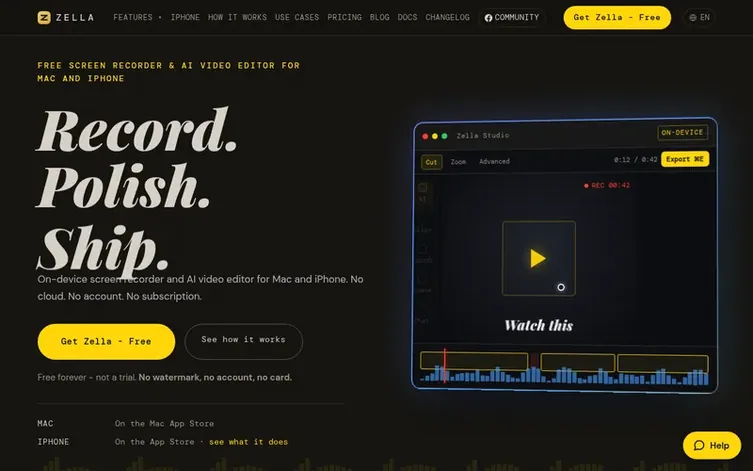
The Zella homepage
Zella is an on-device screen recorder and AI video editor for Mac and iPhone. Record your screen or camera, then one tap Auto-Polish cuts silences, removes filler words, cleans your voice and adds music. Recording, captions, background removal and export all run locally on your device with no cloud, account or upload required.
The app works completely offline and free forever with unlimited recording. Free exports are limited to 2 minutes at 1080p. Pro ($89.99 once) removes export limits and adds 4K, transparent background export, 60fps, templates and advanced editing tools. Founder ($299 once) includes every future major version plus search by what was said, best moments, brand kits and more.
One payment covers both Mac and iPhone as a Universal Purchase. The app contains professional editing tools like keyframes and colour scopes, but they stay hidden behind an Advanced Tools switch until you need them. It is designed for people who have never edited a video before.
On the bill
- Auto-Polish one-tap AI edit that cuts silences, removes filler words, cleans voice and adds music
- On-device captions with no upload required
- AI background removal with 40 built-in scenes
- Reframe to 9:16, 1:1 and 16:9 with face tracking
- 93 colour grades on Mac, 92 on iPhone
- 85 text animations and custom fonts
- AI Assistant edit by typing natural language commands
- Auto B-Roll stock footage integration
- Make it Viral one-tap viral editing with pacing and effects
- Full timeline editor with 50 levels of undo
Pricing
Pricing model: Freemium
Zella Free: $0, unlimited recording, exports up to 2 minutes at 1080p. Zella Pro: $89.99 one-time for Mac and iPhone, unlimited export length, 4K (8K on Mac). Zella Founder: $299 one-time for all future major versions plus Pro features. Pro Week: 7 days of Pro free on every new install.
Get Zella's news by email: milestones, updates, new products and founder stories. Follow to switch it on.
Zella metrics
| Metric | Value |
|---|---|
| Domain Rating | 6 no change since last check |
| Trust Flow | 3 no change since last check |
| Citation Flow | 29 no change since last check |
| Referring domains | 75 no change since last check |
| External backlinks | 514 no change since last check |
Ahrefs Domain Rating reviewed on 25 Nov 2026, a new score on 23 Nov 2026. Its best-known topic: Computers/News and Media (3). Majestic reviewed on 23 Nov 2026, a new score on 23 Nov 2026. Link data credited to Majestic. Trust Flow, Citation Flow and Topical Trust Flow are trademarks of Majestic-12 Ltd.
Zella's domain, behind the curtain
Look behind the curtain
| Domain age | 5 months |
|---|---|
| Registered | |
| Expires | |
| Registrar | Cloudflare, Inc. |
| DNSSEC | Not signed |
Zella's reviews after opening night
Zella went live on Product Debuts on 23 November 2026. Here is what our readings show since then.
- Domain Rating (Ahrefs)
- 6 no change since launch
- 6 at launch (23 Nov 2026), 6 on 25 Nov 2026
- Trust Flow (Majestic)
- 3
- First measured 23 Nov 2026
- Referring domains (Majestic)
- 75
- First measured 23 Nov 2026
Day 2 since launch. Next receipt: day 30, 23 Dec 2026. What the readings say, nothing more: a rise or fall here is not proof of its cause. We leave out anything we have not measured.
Launching your own product?
A free checklist for launch day and the week around it, with a list of launch directories.
Compare and explore
Press questions
Is Zella only for experienced video editors?
No. Zella is built for people who have never edited a video. You record, tap Auto-Polish once, and export a finished video. Auto-Polish does the cutting, voice cleanup, music and pacing automatically. Advanced tools like keyframes and colour scopes stay hidden until you turn them on, and there are 50 levels of undo.
Where does my video go when I edit it?
Nowhere. All recording, captions, background removal, voice cleanup and export run on your device. Nothing is uploaded. There is no account to create and no internet connection is needed. You can test this by putting your iPhone in airplane mode or turning off Wi-Fi on your Mac and exporting a complete video.
Do I have to buy Zella separately for Mac and iPhone?
No. Zella Pro and Founder are Universal Purchases: one payment unlocks both Mac and iPhone together, tied to your Apple ID. Buy on whichever device you use first and it unlocks on other devices when you sign in. Every new install also gets 7 days of Pro free with no card or account required.
Do AI features like captions and background removal need internet?
No. Auto-captions, filler-word removal, silence removal and background removal all run on-device with no internet needed. From version 1.0.7, the captions model comes with the app, so captions work offline from the first launch. The optional AI Assistant and Auto B-Roll are the only features that can use the internet, and only if you choose to use them.
I have never edited a video. Is this too advanced for me?
No. Zella is built for people who have never edited a video. Record, tap Auto-Polish, then export: that is a finished video, and you can stop there for good. Auto-Polish does the cutting, the voice cleanup, the music and the pacing; captions are one more tap, or Make it Viral adds them for you. The tools a professional editor uses (keyframes, curves, colour scopes, masks, speed ramps) stay hidden behind an Advanced Tools switch until you turn it on. Nothing is permanent either: there are 50 levels of undo, and every Auto-Polish step can be removed on its own.
Leave a review for Zella
Zella is waiting for its first review. Take the stage.
Reviews are free. Nobody pays to be reviewed here. See the reviews and chat
Reviews and buzz · Since opening night · Share the debut · Your company on stage? Claim it · Report this debut
Zella has a free listing. The owner can unlock the full profile with a paid launch for $5:
- Founder story (locked)
- Milestones (locked)
- Demo video (locked)
- Dofollow website link: not on this free listing (its website link is nofollow)